Sunday, March 29, 2009

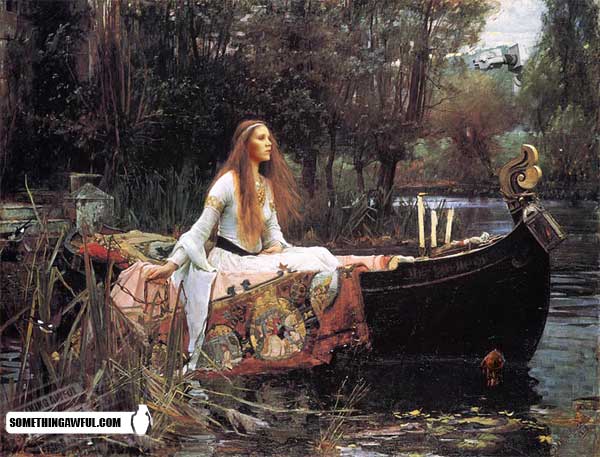
Reimagining great works of art, as they might be in the Star Wars universe


My other favorites: one, two, three, four, and (apparently from some other contest) five. The full gallery is here.

Saturday, March 28, 2009

Google Voice: interface for WAP browser and other tricks

I have one of those cell phones that isn't a fancy cutting-edge touchscreen phone/PDA. It does have a WAP browser. I like it. And since I can use the mobile Gmail client on it, I thought to wonder whether something similar is available for Google Voice. It turns out that it is:

On your phone's browser, enter the URL http://voice.google.com, and you will wind up at the URL https://www.google.com/voice/m/. The interface is nice and clean. I actually like it more that the web interface. It seems to offer every feature that the web client does. (This seems likely to mean that any voice mail you receive will be transcribed and available here as text.) Most importantly, it gives a "Quick Call" option and an SMS option, allowing you to place calls or send text messages that appear to come from (because they are routed through) your Google Voice number, and are without additional charge. The only disadvantage to connecting directly from your phone is that the number must be manually entered, or else found in the Contacts part of the Google Voice interface.

But there is a workaround:

From a GrandCentral Google Group thread:

GV has a nifty feature that you may use to store and call your contacts' cell phones and show your GV number on their phones. This only works with contacts with cell phones that can send and receive text messages.

(1) First make sure you can receive your contacts' calls and messages on your cell phone (If you have set up a particular contact so that their calls are not sent to your cell phone this will not work)

(2) Using GV website's SMS feature send them a message and ask them to reply to it.

(3) When you receive your contact's reply on your cell phone you will notice that it apparently comes from a phone number in the "406" area code. This is a number the GV has assigned to your contact for your account only. Save this number in your cell phone as your contact's phone number.

(4) Call this number next time you want to make a call to your contact from one of your GV recognized phones. The call will go from your phone to GV, GV will know that you are trying to call your contact, it will ring their phones and show your GV account number instead of the number of the phone you are dialing from.

I have been testing this method and so far it seems to work. It is a partial solution to your question but it is definitely more convenient than going through the GV phone menu routine. If you find a kink in this method please publish it as a response to this answer.

This 406 number is assigned for "your" account to "your" contact - so it will be unique to you. The same 406 number may be attached to another person's account for their contacts and it becomes unique to them. The way it works is when you call the 406 number from one of your GV recognized phones it goes to the Google server, the server identifies the originator of the call (you), find out which of your contact it has assigned that 406 number to, and then calls that person's cell phone. According to one Google employee this assignment of the 406 number to the contacts of each account holder will be maintained on a permanent basis so once you have saved the number you may just dial it to reach the contact any time in the future.

Saturday, March 21, 2009

Googling for phrases: Trying to route around new inefficiencies

In the good old days, Google's search engine supported searching for exact phrases in two different ways:
You can search for phrases by adding quotation marks. Words enclosed in double quotes ("like this") appear together in all returned documents. Phrase searches using quotation marks are useful when searching for famous sayings or specific names.
Certain characters serve as phrase connectors. Phrase connectors work like quotes because they join your search words in the same way double quotes join your search words. For example, the search:
[some-example-I-have-forgotten]
is treated as a phrase search even though the search words are not enclosed in double quotes. Google recognizes hyphens, slashes, periods, equal signs, and apostrophes as phrase connectors.

For a while now, the second approach has not been working.
Compare [green-ham-and-eggs] with ["green ham and eggs"]

Out of curiosity, I googled ["green-ham-and-eggs"] and got what appeared to be the same results as for ["green ham and eggs"].

The official position now seems to be:
The hyphen - is sometimes used as a signal that the two words around it are very strongly connected.

There might even be some utility to this interpretation, though for now it is depriving me of my favorite way of refining Google searches.

This blog posting sheds a tiny amount of light on why Google did this. At least, it teaches me how to save a keystroke: in searches, OR can be replaced with | (the pipe symbol or vertical bar).

I'm trying to figure out how to fix this on my own. The most obvious way of restoring this behavior would be to use an URL-rewriting proxy, like ick-proxy.

The knee-jerk reaction is generally to propose some kind of Greasemonkey script or Firefox add-on, but I would like a solution that is as browser-independent (and indeed, computer-independent) and configuration-free as possible.

Someone has also pointed out that the Microsoft search engine supports the dashes-as-phrase-connectors functionality, though I shudder at the idea of switching to Microsoft.

I will report back once I get around to setting up ick-proxy.

Friday, March 20, 2009

Helvetica (the documentary): a summary and an opinionated review

A documentary about a font seems like a wonderfully geeky idea. However, I felt like there wasn't much to this film. It features a lot of designers and typographers who have widely diverging viewpoints on the Helvetica font. (You know, the one that looks like this.)

One guy says that Helvetica is the McDonald's of fonts: a ubiquitous, thing which people choose by default, even though it's crap. Like I hadn't already thought this myself!

Others believe that Helvetica is the evolutionary endpoint of a particular aesthetic, or even the best of all possible fonts.

Still another guy thinks that Helvetica was great in the sixties, but its flaw is that all the characters were meant to look maximally alike which makes it harder to read. Best line of the film: While he describes himself as loving fonts, he says, "I've never sort of woken up with a typeface coming out, you know, like some people... I've got to do this, and they go to their, whatever, their easel, and these amazing brush strokes. I don't have that urge. You know, I wake up and usually I want to go back to sleep."

Beyond the opinions, most of the information in the film may be found in the Wikipedia article on Helvetica (the font).

If you like montages of Helvetica-in-the-wild, this film is for you.

Myself, I prefer Gill Sans.

Edward Tufte does too.

Disabling AdSense's interest-based ads (from both sides)

I still find the idea of my activities being tracked all over
the Internet creepy (though oddly not as creepy when Google
describes it, making it sound like just increasing ad relevance), so I decided to modify the settings on my AdSense account to
opt this blog out of the tracking program which means a) clicks
on ads here will not be added to a user's tracked behavior and
b) ads on this site will not be based on behavior elsewhere.

One can also simply delete and block all cookies from doubleclick.net
to get the same behavior. Or else use the various opt-out schemes.

Saturday, March 14, 2009

Why I subscribed to eMusic and why I eventually cancelled my subscription

I used to buy a lot of CDs, but I disliked having to cart them around every time I moved. To break my habit of poring over the racks at used CD stores, I subscribed to eMusic. There were a lot of tracks that I wanted from the band They Might Be Giants on there, so I took the plunge and swore off the poring. And it was great. I got a very high bang-for-my-buck initially as I first tracked down types of music I liked and plunged deeper into them and then later kept finding new things that I enjoyed. But after the first year, it became more of a chore to search through the music, trying to find something I wanted. One can easily download lots of stuff and wind up deleting it all - if one is a scrutinizing stickler. But I enjoyed the scrutinizing, as I saw eMusic as a good way to cheaply search for amazing new music.

Eventually, I realized that I had just switched from poring over racks of CDs to poring over pages of mp3s. And after a couple of years I was definitely getting diminishing returns. I wasn't always downloading my full 40 tracks before they disappeared at the end of the billing period.

The breaking point came when eMusic announced that they were changing the rates for existing users. For the $10/month subscription, it was going from something like 25 cents per track to 33 cents. I sorted through my iTunes library to determine what my good finds were for the previous year. I figure that there were only about three CDs that I thought were good downloads and three individual tracks. And in terms of actually finding new things, eMusic accounted for less than a third of the year's finds. (I was finding more completely new stuff came through last.fm.) This was no longer worth $120 per year. The final change that really made this decision possible was Amazon's entering the DRM-free mp3 market. That had been eMusic's second-most appealing feature (after price) back when the options were the iTunes Music Store or buying CDs.

I do think that there was a period of about a year and a half where my eMusic subscription was worth what I was paying for it, but whether it was that I could no longer find the tracks that would have appealed to me, or that eMusic has just run out of things I wanted to listen to, the time had come to switch.